Web & CMS
WordPress Site
Full WordPress management from the desktop. Manage content, media, files, plugins, themes, and users.
wp-admin
Access the full WordPress admin panel in an embedded browser
On this page
The wp-admin tab opens your site’s full WordPress admin panel inside an embedded browser. You can navigate any admin page, change settings, install plugins, and manage your site without leaving the app.
Features
- Full embedded WordPress admin panel with automatic login
- Built-in browser toolbar with back, forward, reload, and URL bar
- Find in page search (Cmd+F / Ctrl+F)
- Session and scroll position are saved and restored between visits
- Viewport width control (fill, 1200px, or custom width) for responsive testing
- Vault autofill for credentials
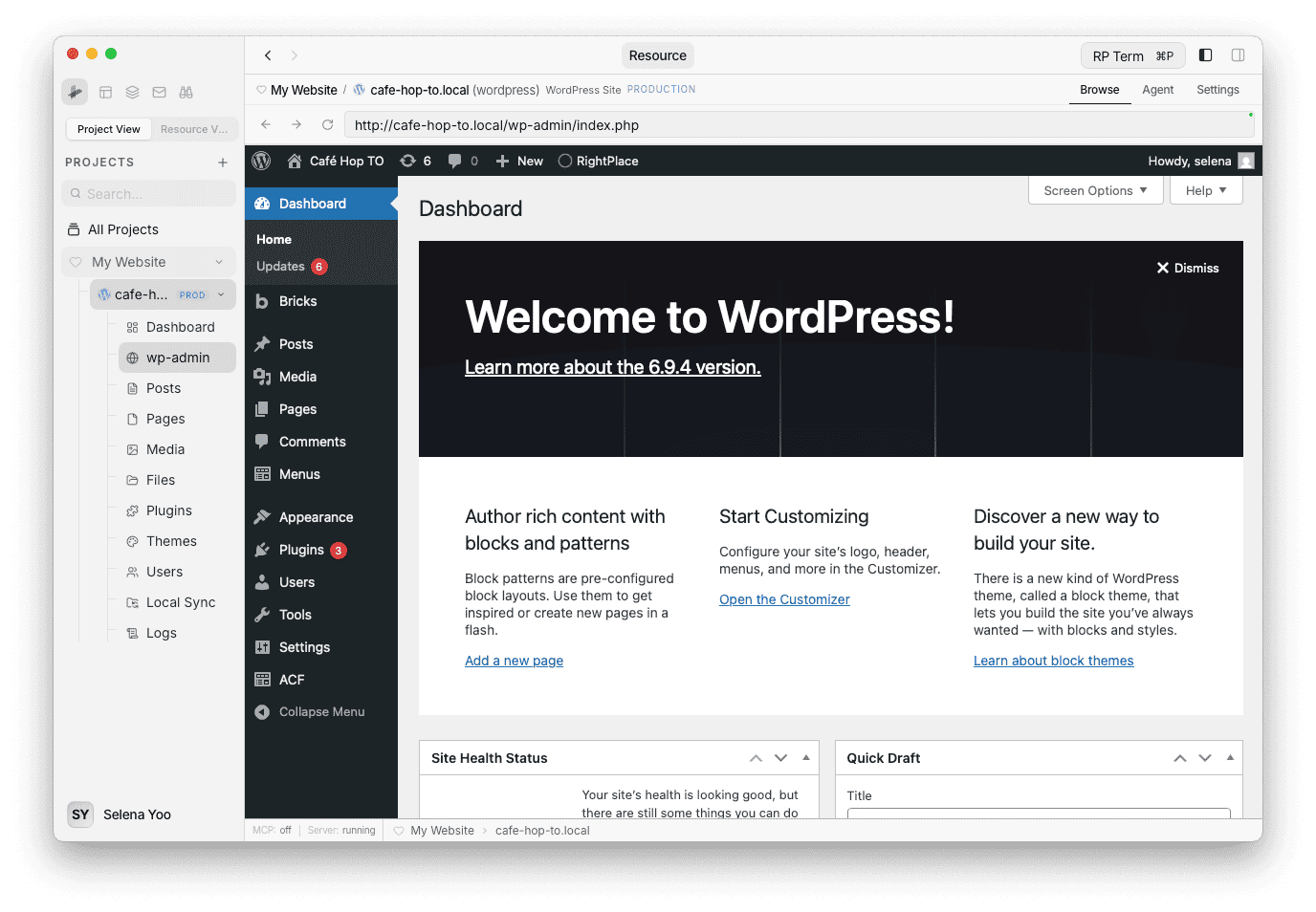
Browser Toolbar
The toolbar at the top provides standard browser navigation:
- Back / Forward - Navigate through your browsing history within the admin panel.
- Reload / Stop - Refresh the current page or cancel a loading request.
- URL bar - Shows the current admin URL. You can type a URL and press Enter to navigate directly.
Find in Page
Press Cmd+F (Mac) or Ctrl+F (Windows/Linux) to open the search bar. Type to highlight matches on the page, and use Enter / Shift+Enter to jump between results.
