Teams need to share files, not just spreadsheets. In a separate syncing setup, I’ve completed a shared-file workflow and verified it with text documents across local and cloud setups. The storage layer isn’t limited to text, but the full workflow has only been verified with documents. This is groundwork for bringing shared files to RightPlace.
Dev Log
Short updates from inside RightPlace as we work through the architecture and ship the next pieces.
-
-
Your team can follow shared work as it changes, even when each person is on a different computer.
I’ve completed the core sharing flow for this RightPlace capability. Each teammate works from a local copy on their own computer. A lightweight cloud connection carries updates between them, without relying on a large central server to store everyone’s working files. That decentralized desktop design is what makes this approach different.
I verified the flow with a shared spreadsheet and drawing board. Edits appeared on other computers, and a computer that reconnected caught up automatically.
It gives RightPlace a practical foundation for teams to stay in step while keeping their everyday work on their own desktops.
The same drawing board open on three computers. A shared spreadsheet open for collaboration. -
Shared work is only useful when edits reach everyone and a conflicting change does not disappear.
I’m testing how spreadsheet sharing could work in RightPlace. In a local syncing tester, I edited cells and pasted ranges across four test clients. I paused the test service during an edit; that change stayed on its client, then reached the others after I restarted the service and retried. When two clients changed the same cell, both versions remained visible for review.
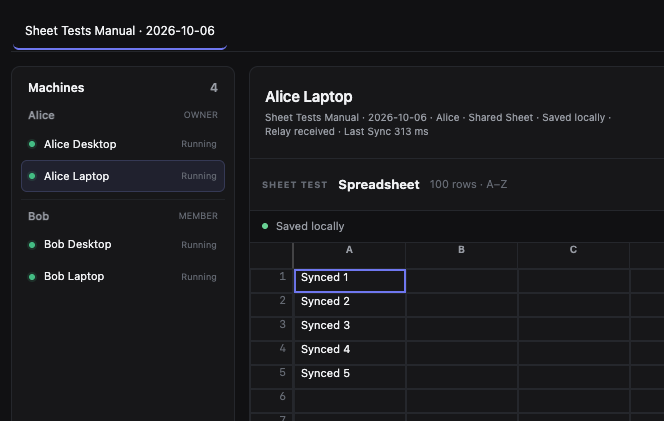
That gives me a practical way to check catch-up and conflicts before bringing shared spreadsheets into RightPlace. This is a local test, and the shared spreadsheet flow has not yet been verified in the RightPlace app or for production.
-
Your work should stay current when you switch computers, even as a project grows. I’m testing that challenge in 0Sync, a separate sync project.
I tested two 1 GB sets of data, one with structured records and one with large files, across four devices. In both runs, a device that had been offline caught up, and a new device received the latest data. Related sync and recovery checks also passed.
This gives me more confidence in keeping larger projects up to date across computers. The 10 GB test is still ahead, and these 0Sync results do not verify a complete RightPlace sync workflow.
-
RightPlace 1.0 is taking longer because I kept expanding the scope beyond the WordPress product we first set out to build. That original WordPress experience is working and already in use. The MCP and CLI tools for WordPress are working too, though I’m still fixing issues.
The basic sync between one person’s computers is now in place. I’m working on the next step: letting a team share projects and applets. That’s a much bigger challenge than connecting one person’s devices.
I want to keep improving the WordPress product people use today while I work through these next steps.